Moving your marketing, sales, and customer data to a new platform is one of the most critical decisions your business will make this year. Thousands of companies are making the switch to HubSpot in 2026, drawn by its powerful AI capabilities, and integrated CRM.But here is the reality: 67% of CRM migrations fail or significantly underdeliver. The difference between a successful transition and a costly disaster often comes down to rigorous planning and partnering with the right experts.
In this guide, you’ll discover exactly how to migrate to HubSpot successfully, avoid common mistakes, and understand what the process involves for modern businesses.
Why Companies Are Migrating to HubSpot in 2026
The surge in adoption isn't just a trend - it's a response to evolving business needs. Here's what's driving the switch:
-
- All-in-One Efficiency: Typical SMEs often juggle multiple tools for email, sales, and content. HubSpot consolidates these into one ecosystem, often reducing software costs by up to 40%.
-
- Scalability: As you expand globally, HubSpot scales with you, supporting multi-currency pricing, multiple languages, and complex sales processes.
-
- AI-Powered Automation: From predictive lead scoring to AI-generated content and automated workflow optimisation, companies use these tools to compete with much larger organisations.
-
- Vast Integration Ecosystem: With over 1,500 integrations, HubSpot connects seamlessly with tools like Xero, Sage, Stripe, and Shopify.
Data Insight: SMEs that migrate to HubSpot see an average 32% increase in marketing qualified leads within the first six months and a 28% improvement in sales productivity.
Common Migration Mistakes (And How to Avoid Them)
-
Migrating "Dirty" Data
The Problem: Exporting an existing database directly into HubSpot without cleaning it first. This results in duplicate contacts and outdated info cluttering your system.
The Solution: Deduplicate contacts, remove unengaged leads (no activity in 12+ months), and standardise formatting.
Pro Tip: Use the "80/20 rule"—prioritise the 20% of data that drives 80% of your revenue.
-
Rushing the Implementation
The Problem: Underestimating complexity and trying to go live in a week.
The Solution: Plan for 4–8 weeks. Use a phased rollout, moving one department at a time to ensure stability. This is where a tailored HubSpot implementation strategy becomes invaluable.
Plan for 4–8 weeks. Schedule comprehensive training and use a phased rollout (one department at a time).
-
Ignoring Integration Mapping
The Problem: Failing to map how HubSpot will talk to your existing accounting or e-commerce tools.
The Solution: Create a comprehensive integration map during the planning phase. Test real-time syncs before the final go-live.
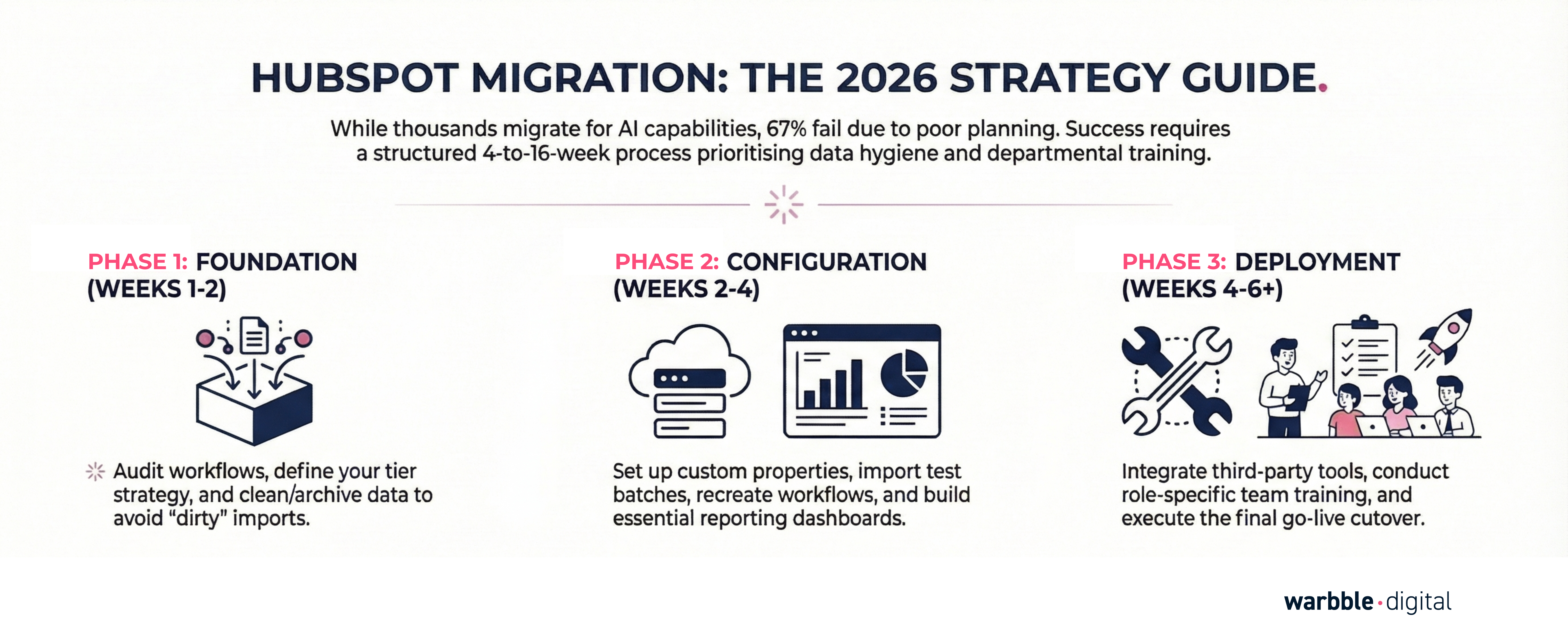
Your 10-Step HubSpot Migration Checklist
-
Step 1: Audit Your Current System (Week 1) – Document all workflows, integrations, and data volumes.
Step 2: Define Your Strategy (Week 1) – Choose your tier (Starter, Pro, or Enterprise) and map your sales stages.
-
Step 3: Clean Your Data (Week 2) – Standardise fields and archive old records that don't need to move.
Step 4: Configure HubSpot Structure (Weeks 2-3) – Set up branding, custom properties, and user permissions.
-
Step 5: Import Data (Week 3) – Start with a small test batch (100–500 records) before the full import.
-
Step 6: Recreate Essential Workflows (Weeks 3-4) – Prioritise business-critical automations and internal notifications.
-
Step 7: Set Up Reporting (Week 4) – Build dashboards for sales, marketing, and leadership.
-
Step 8: Integrate Your Tools (Weeks 4-5) – Connect email, accounting, and payment processors.
-
Step 9: Team Training (Weeks 5-6) – Conduct role-specific sessions and provide internal documentation.
-
Step 10: Go Live and Optimise (Week 6+) – Execute the cutover and monitor performance closely.
.png?width=7912&height=2000&name=PHASE%201%20(1).png)
How Long Does a Migration Take?
|
Migration Type |
Timeline |
Complexity |
|
Simple |
4 – 6 Weeks |
Small database, standard workflows, no custom integrations. |
|
Standard |
6 – 10 Weeks |
Mid-size database, multiple departments, 3–5 integrations. |
|
Complex |
10 – 16 Weeks |
Enterprise level, custom API work, multi-language/currency. |
FAQs
Ready to Transform Your Business?
Is Your Data Ready for the AI Revolution?
A successful HubSpot migration is only the first step. To truly leverage HubSpot’s 2026 AI capabilities, your data and processes need to be "AI-ready." Don't migrate yesterday's problems into tomorrow's tools.
Sign up for our free AI readiness assessment from one of our experts
.png?width=1584&height=396&name=warbble.digital%20Thrive%20Hubspot%20experts%20(4).png)